
Matching console mounting to the role
No two positions on an operations floor have quite the same screen needs. A map-heavy role wants width. A records-heavy role wants several standard displays side by side. A supervisor wants a wide view of the floor’s status. Treating every seat the same, or forcing one screen format on all of them, leaves operators working around their setup instead of with it.
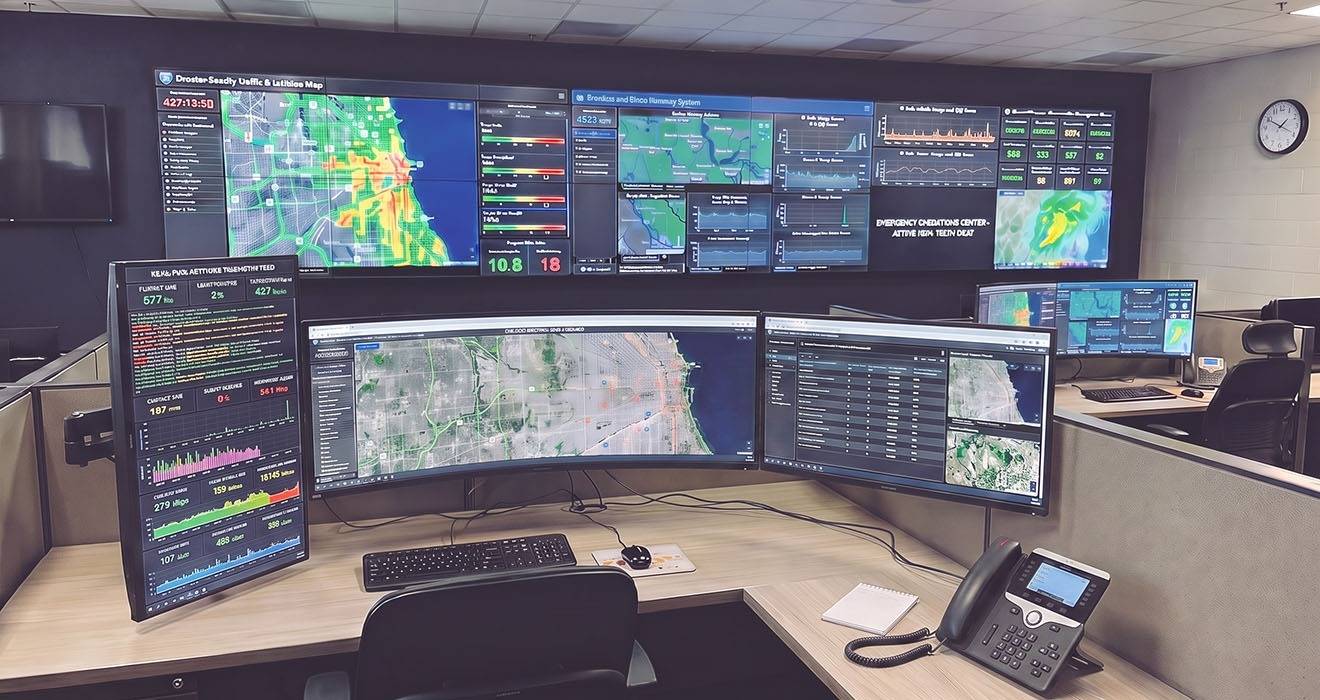
Single or paired ultrawide monitors
For roles built around mapping and situational displays, an ultrawide gives a continuous, uninterrupted view. No bezels cut across the map at inconvenient moments. A single ultrawide suits many map-focused seats. A pair of ultrawides, or an ultrawide flanked by a standard screen for call handling, suits operators who need both the wide view and their working applications at once.
Ultrawide monitors are large and, in curved form, awkward for less well designed monitor arms to hold well. That is because the curvature radically increases the load on the monitor, versus a flat screen style of the same weight. The monitor arm must carry the ultrawide screen's size and shape, while still giving the operator full height, depth, and angle control.
Why many operators prefer the curve
Ask operators who have moved to a curved ultrawide and a consistent theme comes back: the curve is easier to work at. The panel wraps slightly toward the viewer, so the far edges sit at a more even distance from the eye than they would on a large flat screen - so the whole width stays roughly in focus at once. Operators report that this makes it easier to take in the full spread of visual data, a map alongside a status board and several data panels, without repeatedly turning the head or leaning in to read the far corners.
For a role that lives inside one wide workspace for a whole shift, that even sightline matters. It is the same ergonomic logic as screen height and distance: the less work the eyes and neck do to reach the information, the longer an operator stays comfortable and sharp. A curved ultrawide only delivers that when it is held steady at the right height and angle, which puts the same demand on the mounting as any other critical display, with the added point that a curved panel is more awkward to support well than a flat one.
The learning curve nobody budgets for
One big panel brings a catch that a row of separate screens does not. Separate monitors give an operator natural anchors: one application per screen, each in a fixed place, found by muscle memory. An ultrawide monitor is a single continuous canvas with no bezels to divide it, so the operator has to arrange their own application windows across it, deciding where the map sits, where call handling goes, where records and status live.
Doing that well, and doing it quickly at the start of every shift, is a skill in itself. Newer operators are often slower to lay out their workspace than to use it, and an untidy layout wastes the very space the ultrawide was bought to provide. Facilities that adopt ultrawides tend to find they have to train for it: agreed window layouts per role, guidance on arranging them, and the window management or saved profile tools that let an operator restore a known arrangement in seconds rather than dragging windows into place by hand at the top of every shift. It is a modest investment, but it is a real one, and it is easy to overlook when only the hardware is being specified.
When software insists on a resolution
One more thing to check before deploying roles ultrawide monitors is that the necessary software that will run on it well. Not every application adapts gracefully to a very wide panel. Interfaces built for a fixed 16:9 layout can stretch, crop, or push controls out toward the far edges when put on a 21:9 screen, and older applications that predate ultrawide monitors and high-density displays are the most likely to misbehave.
This is not hypothetical. Some professional software still carries very specific display requirements in its own documentation. Going outside the emergency operations industry (but within Atdec's world), is the Computer Aided Design (a different CAD acronym versus Computer-Aided Dispatch) software package 'cadwork'. It specifies that on a 1920 by 1080 screen Windows display scaling has to be set to exactly 100%, or some of its screen boxes may no longer be fully accessible - and it sets a minimum and maximum screen size for each resolution because its on-screen rendering degrades outside that range. An application with rules that specific will not automatically look right on whatever ultrawide you happen to choose.
The lesson is straightforward: confirm that the critical applications for a role actually display correctly and function well at the ultrawide’s native resolution before committing to it. It is a quick check, and it heads off the worst kind of surprise.
The dense multiscreen position
Other roles are better served by several displays than one large one. A dispatcher juggling CAD, records, call handling, and status may want four or more screens arranged so each application has a fixed home. Muscle memory does a lot of work under pressure, and a stable, well-arranged array lets an operator glance rather than search.
Dense arrays put real demand on mounting. The load is higher, the geometry is tighter, and every screen still needs individual adjustment so the operator is not stuck with a compromise across the whole cluster.
The right number of screens is the number the role needs, arranged so the operator can glance rather than hunt.
Shared and status displays
Beyond the operator positions sit the shared views: wall-mounted status boards, mapping, and incident displays that give the whole floor a common picture. These have their own mounting requirements, driven by sightlines and screen size rather than reach, but they belong to the same conversation, because a coherent floor plans its personal and shared displays together.
Atdec has a complete wall mount package, with single screen brackets for wall mounted screens, plus a modular wall mount solution for - theoretically - infinite video wall arrays. We similarly offer standard and modular ceiling mounts and floor mounts.
THis means Atdec can provide every monitor arm and screen mount bracket that emergency operations require.